
W-4
Employee withholding · 2026
Form W-4 tells your employer about your federal income tax withholding. Complete the employee’s withholding certificate in your browser, review the official PDF and download your copy.
Preparing the official PDF. You can start filling below.
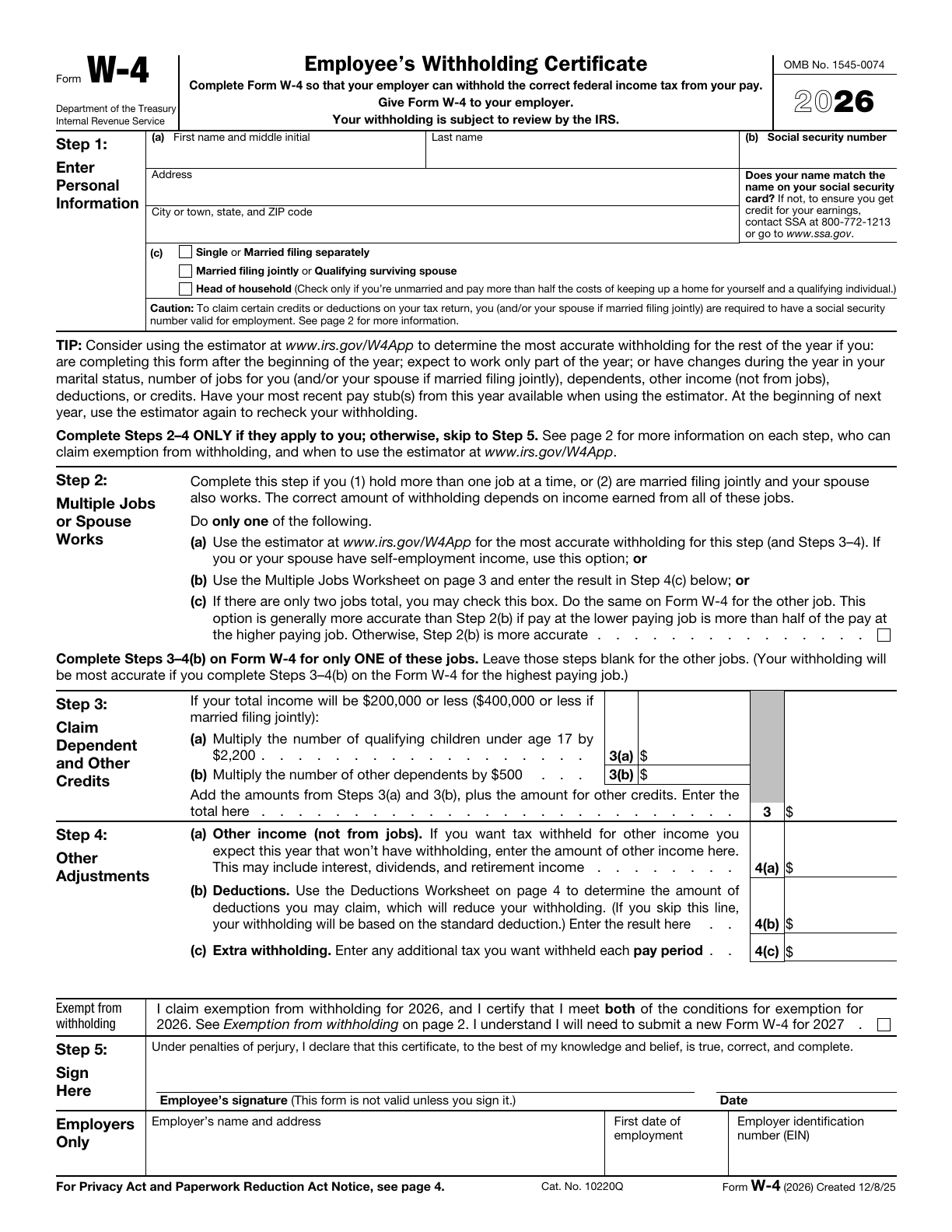
Source: IRS · W-4 · 2026 · Official blank PDF
What to have ready Have your name, address and Social Security number ready. Read the official instructions and gather the job, income, dependent and deduction details needed for the sections and worksheets that apply. Nonresident aliens must first read Notice 1392 and complete its special instructions; this editor does not add an NRA annotation or determine tax residency. Use the IRS estimator when the official instructions recommend it, such as for midyear or self-employment changes.
See what each W-4 step is for
Select a step to find its position on page 1 of the official form. Complete only the parts that apply; every blank does not need an entry.
This detail is from the official English original. Labels identify locations and do not change the original form.
1Step 1 · Personal information
Enter your name, Social Security number, address and expected filing status.
2Step 2 · Multiple jobs
If you hold more than one job at a time, or file jointly and your spouse also works, choose one applicable Step 2 method.
3Step 3 · Credits
Enter eligible dependent and other credit amounts in dollars, not the number of dependents. Calculate the total yourself.
4Step 4 · Other adjustments
Check other annual income, annual deduction adjustments and extra withholding per pay period. These entries use different units.
5Step 5 · Sign
After downloading and reviewing, complete the required employee signature and date. This tool does not sign or submit the form.
Complete Steps 2–4 only when they apply. Check the special conditions before claiming exemption from withholding. Complete the Step 5 signature and date after downloading.
Read the complete official W-4 instructionsChoose one method for multiple jobs
Step 2 applies when you hold multiple jobs at the same time, or are married filing jointly and your spouse also works. Choose one of the following methods.
| Method | When and how to use it | Official tool or instructions |
|---|---|---|
| IRS withholding estimator | Have current pay stubs and relevant income information ready. If you or your spouse have self-employment income, use this option. | Open the IRS estimator |
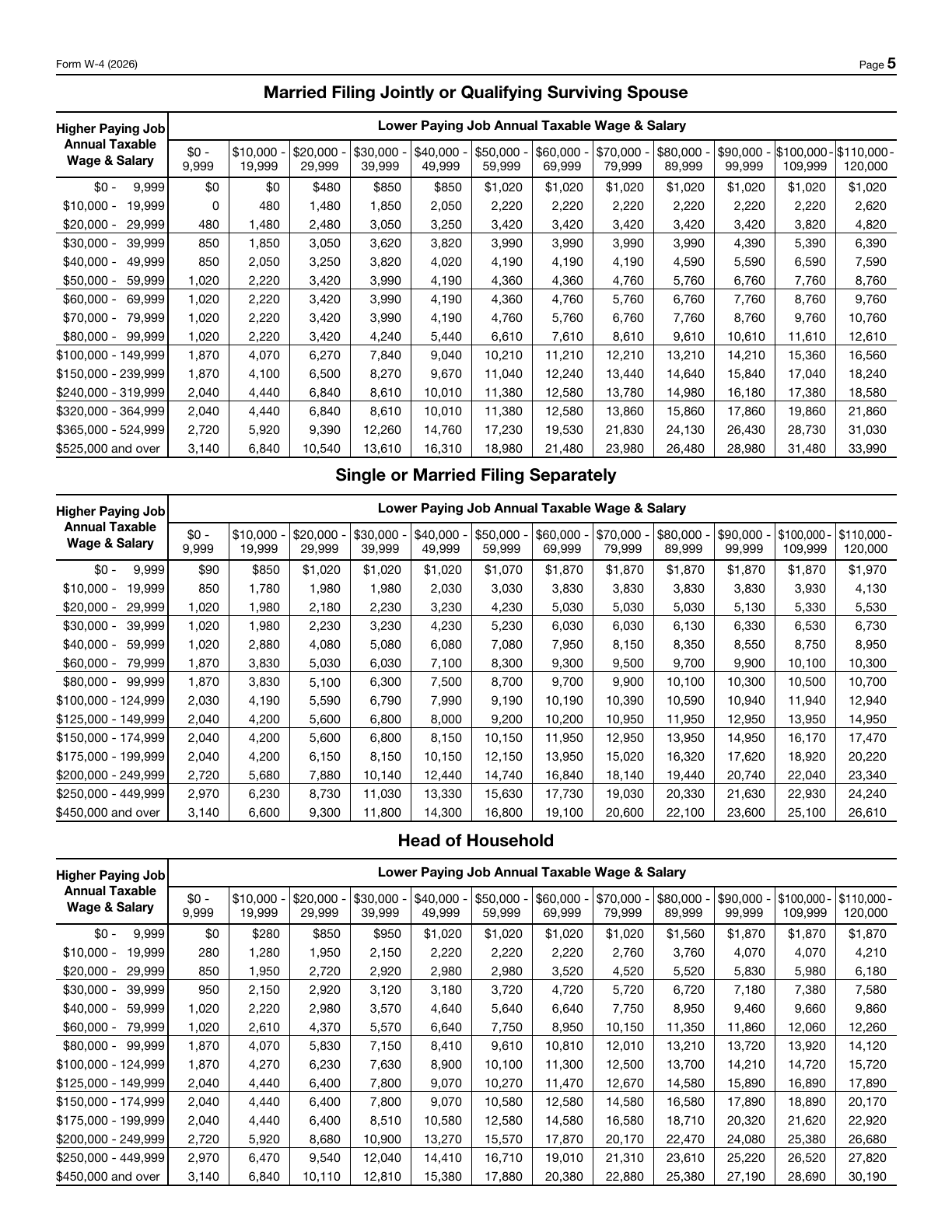
| Multiple Jobs Worksheet | Use the worksheet on page 3 and the wage tables to calculate the result manually. Review it before using it in Step 4(c). | View the Multiple Jobs Worksheet |
| Step 2(c) two-job option | Use only when there are two jobs in total, and check the box on both W-4s. If the lower-paying job pays more than half the higher-paying job, this option is generally more accurate than the worksheet; otherwise, the worksheet is generally more accurate. | Check the Step 2(c) conditions |
For multiple jobs, complete Steps 3–4(b) on only one W-4, usually for the highest-paying job. Leave those steps blank for the other jobs. Review all the W-4s together.
Annual amounts and amounts per paycheck are different
Check whether an entry asks for an annual amount, an amount per pay period or a credit amount before filling it in.

Step 3 · Credit amount · USD
Enter eligible dependent and other credits as dollar amounts, not the number of dependents.
Step 4(a) · Annual income · USD
If you want tax withheld from your pay for other income that you expect for the year and that will not have withholding, enter that annual amount here. Do not include income from jobs or self-employment. Examples include interest, dividends and retirement income; this is not tax per paycheck.
Step 4(b) · Annual deduction adjustment · USD
Use the instructions and Deductions Worksheet to determine the annual adjustment. Do not copy the basic standard deduction directly into this line.
Step 4(c) · Per pay period · USD
Enter the extra tax you want withheld from each paycheck, not an annual total.
This tool does not calculate tax or worksheet totals automatically. Check amounts using the official instructions and review existing entries before explicitly transferring a worksheet result.
Separate the employer’s certificate from your worksheets
Give page 1 of your completed Form W-4 to your employer. The download contains all 5 original pages; the worksheets on pages 3–4 are for your own records and can contain private household income details. Keep them separately as appropriate. The PDF is unsigned: complete the required signature and date after downloading, following your employer’s instructions. FormAgile does not submit the form.
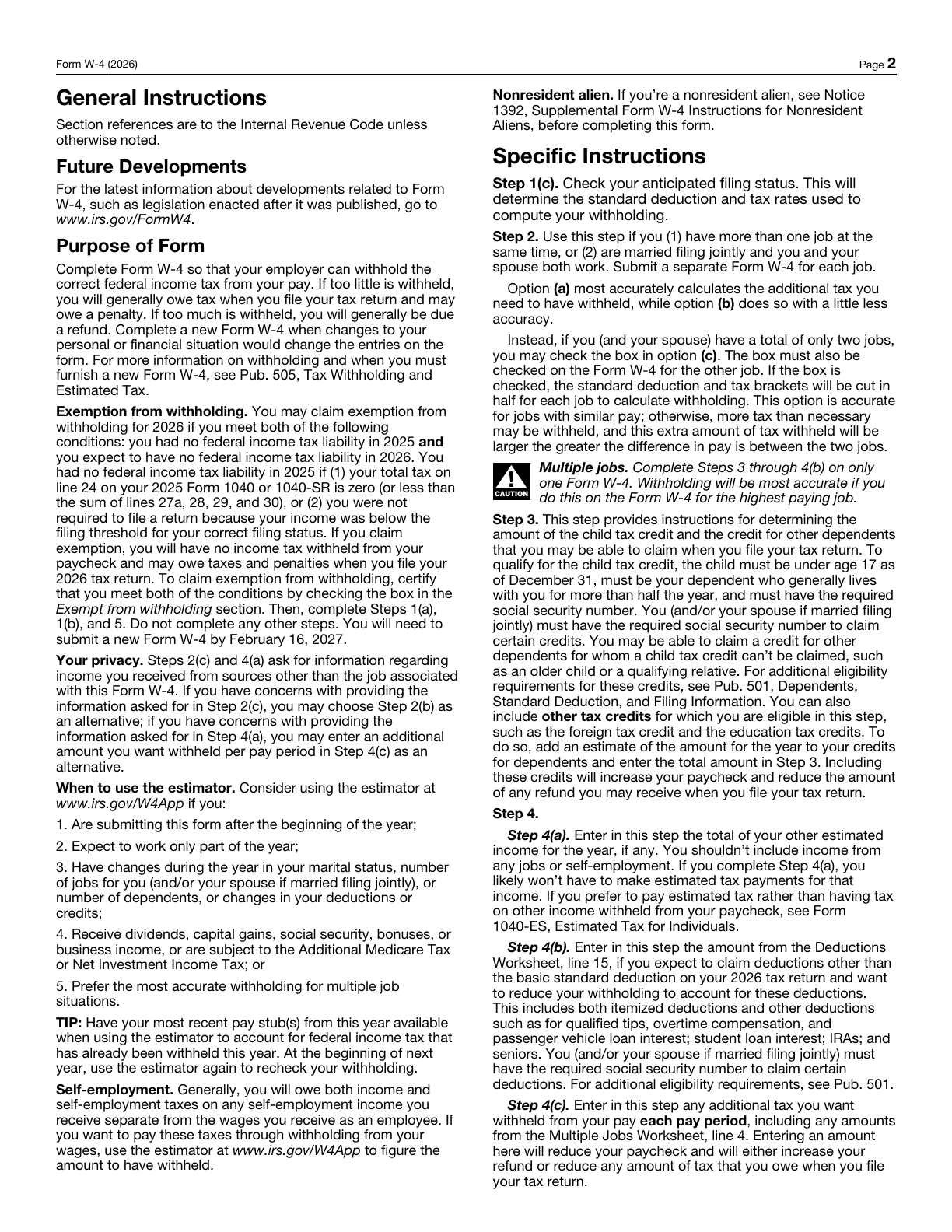
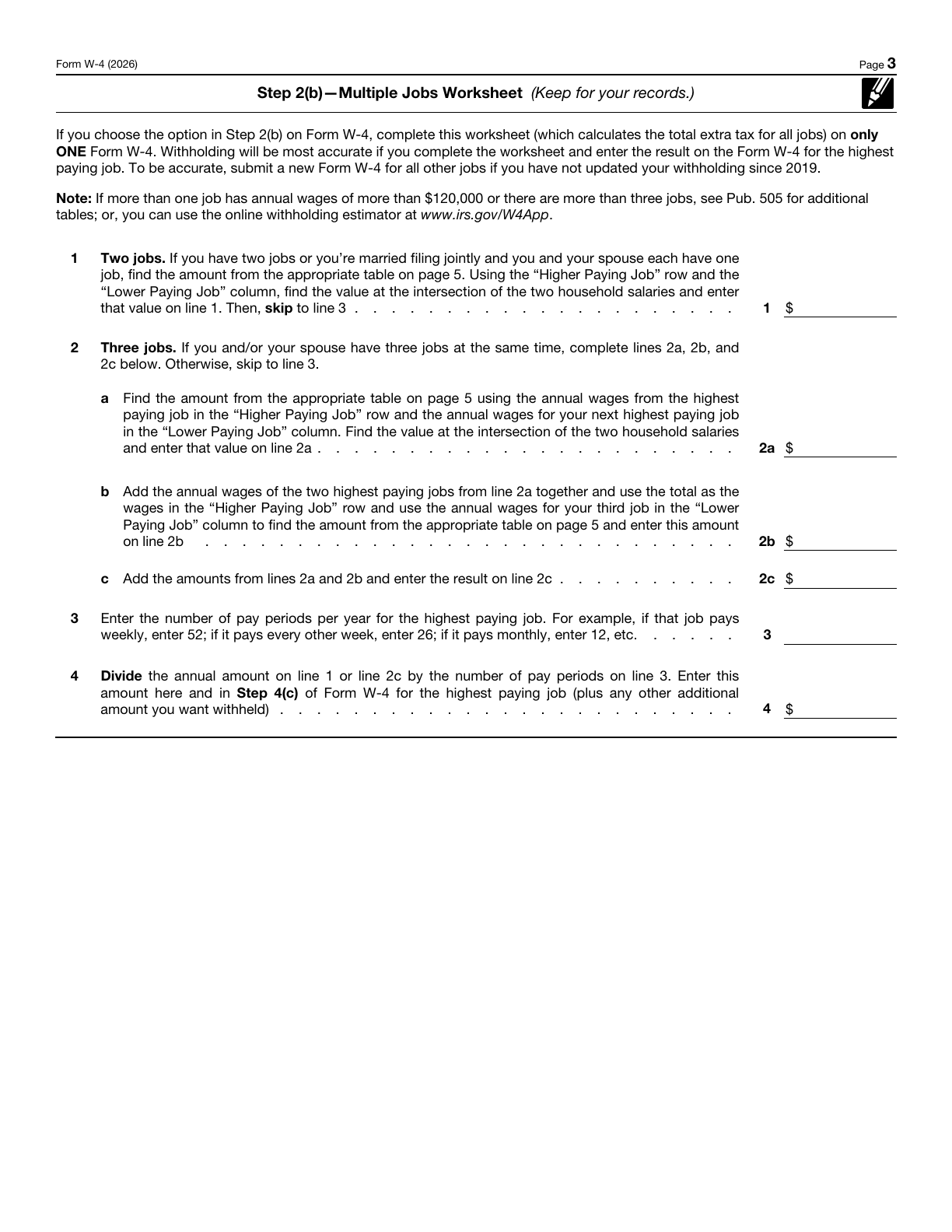
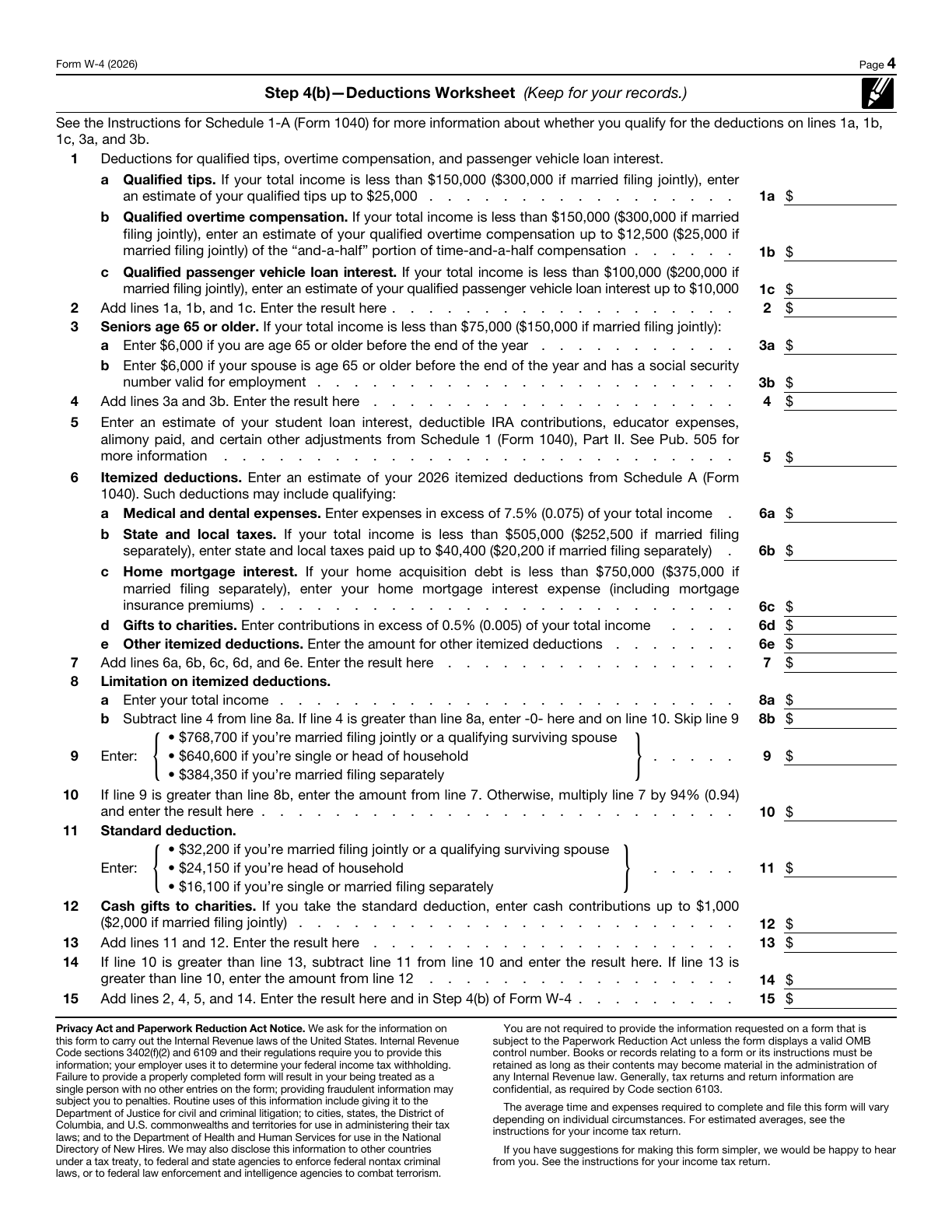
Download includes all 5 original pages
The download preserves the complete official PDF. Check the pages you actually send.
Page 1 · Give to your employer
Review the employee withholding certificate, complete the required signature and date, then deliver it as your employer instructs.
The PDF is unsigned and has not been submitted. Complete the required signature and date after downloading. This tool does not split the file automatically; check the actual pages you send and your employer’s requirements.
View the original PDFSpecial situations and tool limits
Planning to claim exemption from withholding?
For the 2026 W-4 provided here, claim exemption only if you had no federal income tax liability for 2025 and expect none for 2026. Check the definitions, exceptions and renewal deadline on page 2 of this official version. This tool does not determine eligibility. If eligible, check the Exempt from withholding box and complete only Steps 1(a), 1(b) and 5, not the other steps.
Read the official form and all instructionsNonresident alien? Read Notice 1392 first
Nonresident aliens must read Notice 1392 before completing W-4 and follow its special instructions. This editor does not determine tax residency or add an NRA annotation. If special annotations are required, handle the downloaded file according to the official instructions or use the official original.
Read the official form and all instructionsMidyear changes, self-employment or other complex income?
Consider the IRS estimator when you complete W-4 midyear, work only part of the year, or have changes in marriage, jobs, dependents, income or deductions. Have recent pay stubs ready. If you or your spouse have self-employment income, use the estimator under Step 2(a). For job counts beyond the built-in worksheet path or other complex cases, check the complete instructions and Publication 505. Enter worksheet results and totals manually; this tool does not calculate tax, determine eligibility or automatically fill totals. Explicit transfers require confirmation before replacing an existing amount.
Read the official form and all instructionsHow are my entries handled?
Your entries are processed in this browser page. Each form keeps its own draft during site navigation; refreshing or closing the page clears the drafts. Optional analytics, including Clarity recordings, follow your choice in Analytics settings and the Privacy Policy. Download a copy to keep your work.
Can I edit the downloaded PDF?
Yes. The exported PDF preserves all 5 original pages and editable fields. It is unsigned. Follow the recipient’s signing and delivery requirements.
Why might some text need review?
The original PDF has limited field space. If text cannot fit or its characters are unsupported by the PDF font, we will identify the field so you can revise it. We never silently remove characters or clip overflowing content.
Check the official W-4 guidance
Use the original form, IRS instructions and withholding estimator for the circumstances that apply to you.
W-4 · 2026
FormAgile is an independent service, not affiliated with the IRS or any government agency. Official blank forms are available free from the IRS. This tool does not provide tax or legal advice.