
4506-T
Tax records request · April 2025
Request IRS return, account, wage and income records or verification of nonfiling. Choose the products and complete period-end dates, then download the official two-page Form 4506-T to review, sign and send.
Preparing the official PDF. You can start filling below.
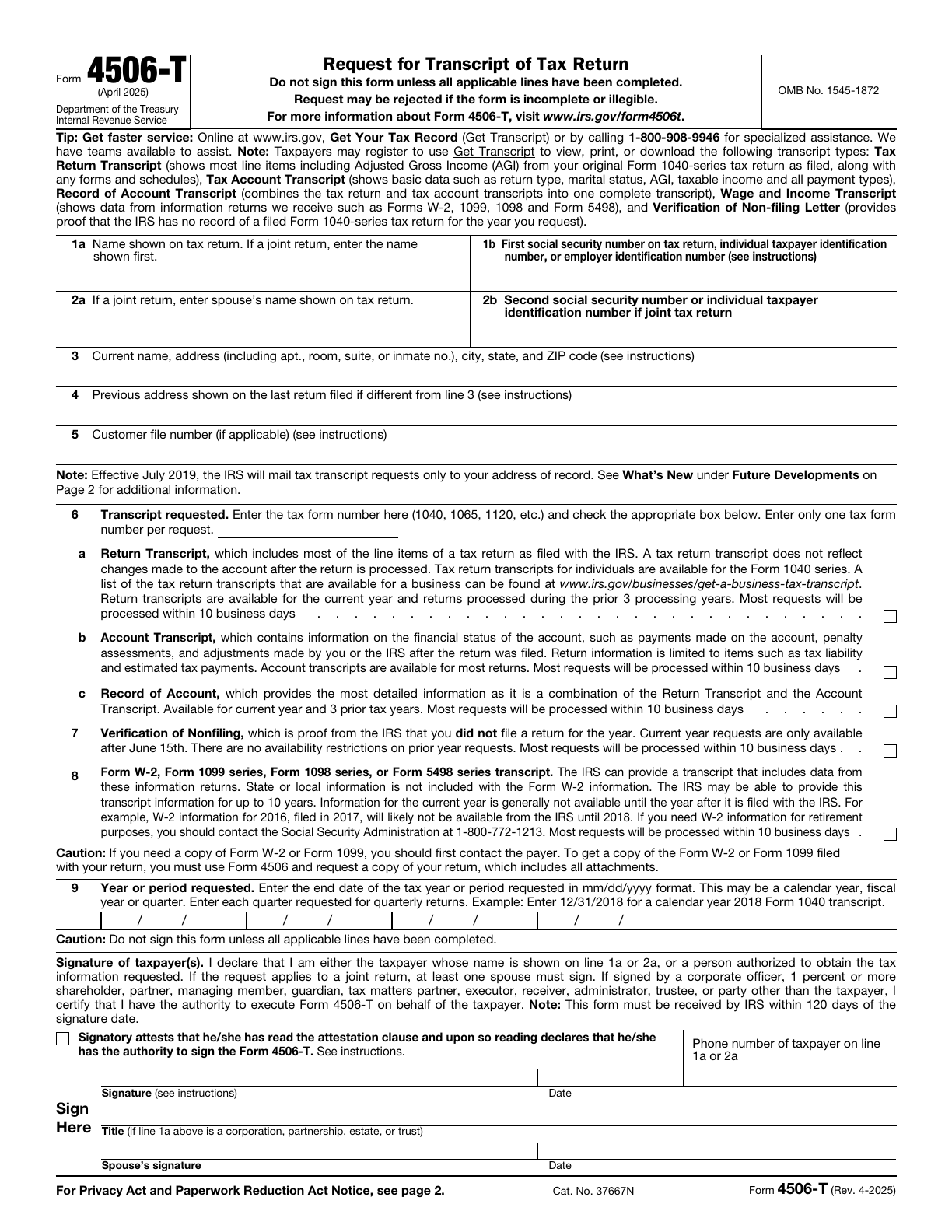
Source: IRS · 4506-T · April 2025 · Official blank PDF
What to have ready Have the taxpayer’s name and number, current name and address, requested records and up to four complete period-end dates. If you have filed a return, also check its taxpayer order and any different previous address. Gather supporting signature authority when applicable.
Request the right record, not another tax return.
Form 4506-T prepares a request for transcripts or a nonfiling letter. It does not file a return, produce a photocopy, update an address or send records to a third party.

Find the record, then choose the period.
A transcript summarizes existing IRS records. Start with the information you need, then match the taxpayer and the actual period-end dates.
Availability depends on the product, period and IRS records. This editor does not establish eligibility or guarantee processing.
What each record tells you
Choose the content you need. The three line 6 products are alternatives; line 7 and 8 can be added independently.
| Record | What it contains | Availability to check |
|---|---|---|
| 6a · Return transcript | Most original return line items; excludes later account changes. | Original: current year and prior three processing years; business availability varies. |
| 6b · Account transcript | Payments, assessments and adjustments, with limited return information. | Available for most returns; check the IRS for the period needed. |
| 6c · Record of account | Combines the return and account records. | Original: current tax year and three prior tax years. |
| 7 · Verification of nonfiling | The IRS has no filed return on record for that year; it does not decide your filing obligation. | Current-year requests only after June 15; the original lists no prior-year restriction. |
| 8 · Wage and income | Information returns such as W-2, 1099, 1098 and 5498; no W-2 state/local data. | The original says up to ten years may be available. Recent information can arrive later. |
A tax period ends on a date.
Line 9 asks for the end of the year or period. A calendar year, fiscal year and quarter can end on different dates. For quarterly returns, enter each requested quarter separately.
Illustrative calendar year 2024: enter 12/31/2024, not just 2024.
Fictional examples only. These controls do not change your entries or select a filing period for you.
See the four date groups on line 9
An address on this request is not an address update.
Enter your current name and address on line 3. If you have never filed a return, leave line 4 blank; otherwise add the last return address only if different. Include P.O. box or inmate details when applicable. The IRS mails transcripts only to its address of record. Use 8822 for an individual or 8822-B for a business separately if that record needs updating. Do not enter a lender or other third-party recipient.
Compare the two address lines on the original
Complete, sign, then mail or fax.
Download both original pages, review, sign and date, then mail or fax using the original instructions. This editor does not submit the request.
Review every applicable line
Check the taxpayer order, selected records, single line 6 tax form, addresses and complete period-end dates. A transcript is not a copy of your return; use Form 4506 when an actual copy is needed.
Sign with the right name
Individuals signing for themselves: sign using the name on line 1a or 2a. If you filed under a different name, sign as on the original return and also sign your current name. At least one spouse signs a joint request.
Confirm authority, then sign and date
Read the attestation and check the authority box before signing and dating. Entities must attach the required authority documents. A representative must attach Form 2848 showing the specific delegation on line 5. The IRS must receive the request within 120 days after signing.
Use the correct original mailing chart
Page 2 has separate charts for individual and other transcripts. Use the state where you lived or your business was located when that return was filed. If multiple requested products point to two addresses, use the address based on your most recent return.
The download contains both original pages with blank signature and date lines to complete after review. FormAgile does not sign, mail, fax or submit the request. The original’s processing estimates are not a guarantee.
Read the full attestation and paper-signing area
Two mailing charts, based on the requested record
Use these April 2025 original charts with the complete instructions. The comments address in the Paperwork Reduction notice is not a request destination. Check the current IRS product page before sending.
Read the full original and instructionsSpecial situations and tool limits
Is there a faster way to get my records?
IRS transcripts are free. The IRS offers online and automated transcript services. Check the official Get Transcript options and identity requirements; using this editor only prepares a paper request.
Read the official form and all instructionsIs a transcript the same as a copy of my return?
No. A transcript summarizes IRS record data. Use Form 4506 to request an actual tax-return copy, subject to its own requirements and fees.
Read the official form and all instructionsHow are my entries handled?
Your entries are processed in this browser page. Each form keeps its own draft during site navigation; refreshing or closing the page clears the drafts. Optional analytics, including Clarity recordings, follow your choice in Analytics settings and the Privacy Policy. Download a copy to keep your work.
Can I edit the downloaded PDF?
Yes. The exported PDF preserves all 2 original pages and editable fields. It is unsigned. Follow the recipient’s signing and delivery requirements.
Why might some text need review?
The original PDF has limited field space. If text cannot fit or its characters are unsupported by the PDF font, we will identify the field so you can revise it. We never silently remove characters or clip overflowing content.
Keep the official record request close
This guide follows the April 2025 Form 4506-T. Read the current IRS instructions and record availability before signing.
4506-T · April 2025
FormAgile is an independent service, not affiliated with the IRS or any government agency. Official blank forms are available free from the IRS. This tool does not provide tax or legal advice.