Old mailing address · Line 5
Provide the old number and street, room or suite, city, state and ZIP, or the complete foreign format. Do not substitute the new address for the old record.

Business record changes · December 2019
Update the IRS records for a business or other entity with an EIN. Enter the old mailing address, add the changes that apply and download the official two-page Form 8822-B for review, signing and delivery.
Preparing the official PDF. You can start filling below.
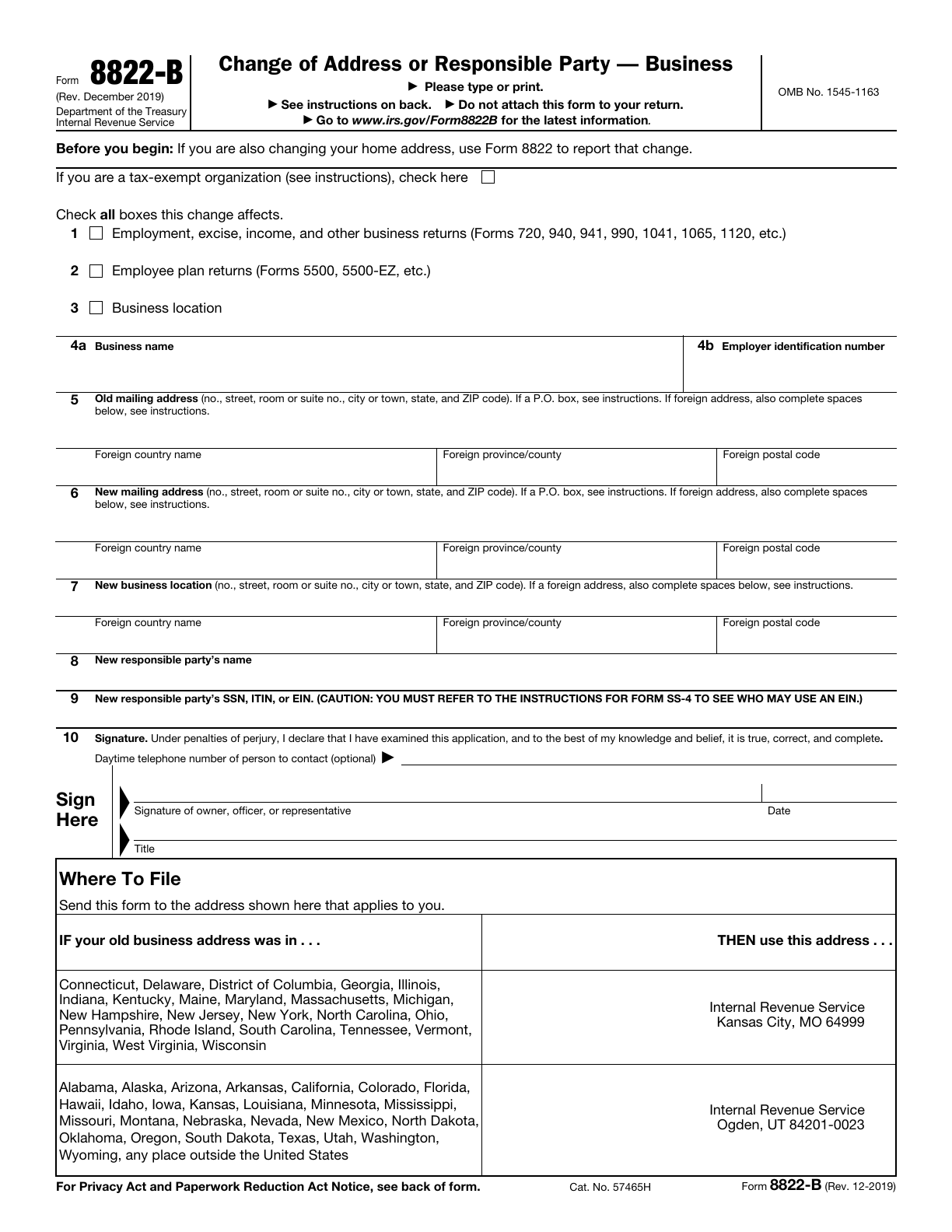
Source: IRS · 8822-B · December 2019 · Official blank PDF
What to have ready Have the existing business name and EIN, the old mailing record, any new mailing address or business location, and the new responsible party’s name and permitted tax identifier ready. Keep apartment, room, suite and C/O details where applicable. A representative needs a copy of the power of attorney.
8822-B updates an existing record. It does not apply for an EIN, change the business name or combine all address roles into one entry.

Use the existing EIN account to identify the entity, then distinguish a new mailing address from a new place of business.
Illustrative scene; it is not an IRS record, a completed form or proof that an update was accepted.Check the affected return categories independently, then enter the business name and EIN already associated with the account.
The old mailing address identifies the previous record. Add a new mailing address and a new business location only when each changes; the three groups are independent.
Provide the old number and street, room or suite, city, state and ZIP, or the complete foreign format. Do not substitute the new address for the old record.
Turn on the new-mailing-address section when correspondence should go somewhere different. Leaving that change off does not report a blank replacement address.
Match the old record → enter only the new details that apply
Report the new place of business separately from the mailing destination. Enabling this section corresponds to the official Business location box; it does not fill the new mailing address.
For a foreign address, keep the full local street and city on the main line, use the country name without abbreviating it, and follow that country’s province and postal-code practice. A province or postal code is not universally required.
For mail received through another person, include C/O and that person’s name with the address. A C/O contact is not automatically the responsible party or an authorized representative.
Use a P.O. box instead of the street address only if the post office does not deliver mail to the street address, as the official instructions specify.
Use the previous mailing address for the existing EIN account. This is different from the new address you want the IRS to use.
Complete this line when the mailing address changes. The separate editing switch does not add a printed checkbox to the official form.
This is a separate address role. Select the official Business location box when that change applies; no mailing address is copied here.
Choose each affected category yourself. Changing the responsible party does not automatically select the business-return, employee-plan or business-location boxes.
Use the separate change switch for a new responsible party. Select the identifier category yourself; tax-exempt status does not establish that the entity is a government entity.
Enter the new responsible party and an identifier permitted by the current SS-4 instructions. The person is not inferred from the signer or C/O contact.
Choose the state of the old business address, or an address outside the United States. This separate lookup follows the mailing table on page 1; it does not read or change your form answers.
Use the old business address, not the new destination. This lookup is for preparing a paper mailing and does not submit the form or verify an address.
Select the old business region to see a paper mailing center. Nothing is selected from your old or new address entries.
The download contains all 2 original pages, including the instructions. Review the entries, sign and enter the actual date on paper, then follow the official delivery instructions. FormAgile does not sign, mail or submit the update.
Check the original and its instructions before using the downloaded document.
Confirm the business name and EIN, old mailing address, affected categories and only the new details that apply. The complete download keeps both original pages.
An officer, owner, general partner, LLC member manager, plan administrator, fiduciary or authorized representative must sign as applicable. Enter the actual signing date on the printed line; the typed title is separate.
For a paper filing, use the page 1 table and the independently selected old-business-region lookup above. Follow the official form’s separate-mailing instructions rather than assuming that attaching it to a paper return is sufficient.
The form has paper signature and date lines. A contact telephone number or a typed title does not create a signature; this editor does not add signature or date fields.
Downloading does not sign, send or complete the IRS update. Keep the required supporting authorization with the signed form.
Use Form 8822 for a home-address change. Form 8822-B updates the business or entity’s mailing address, business location or responsible-party record associated with an EIN. If both home and business details change, review the instructions for each form.
Read the official form and all instructionsLine 4a identifies the business on the existing EIN account. A business-name change follows the IRS procedure for that entity and return type; entering a new name on this form does not replace that procedure.
Read the official form and all instructionsAn authorized representative may sign, but must attach a copy of the power of attorney. Form 2848 can be used for this purpose. Receiving mail C/O an accountant or attorney does not by itself authorize that person to sign or request a change.
Read the official form and all instructionsYour entries are processed in this browser page. Each form keeps its own draft during site navigation; refreshing or closing the page clears the drafts. Optional analytics, including Clarity recordings, follow your choice in Analytics settings and the Privacy Policy. Download a copy to keep your work.
Yes. The exported PDF preserves all 2 original pages and editable fields. It is unsigned. Follow the recipient’s signing and delivery requirements.
The original PDF has limited field space. If text cannot fit or its characters are unsupported by the PDF font, we will identify the field so you can revise it. We never silently remove characters or clip overflowing content.
The editor uses 8822-B, revision December 2019, with 2 original pages. The form and official instructions remain in their original language.
8822-B · December 2019
FormAgile is an independent service, not affiliated with the IRS or any government agency. Official blank forms are available free from the IRS. This tool does not provide tax or legal advice.