
8821
Tax information access · January 2021
Authorize named designees to inspect or receive the specific tax information you list. Prepare the official one-page Form 8821, review the scope, then download it to sign and deliver. This is not a power of attorney.
Preparing the official PDF. You can start filling below.
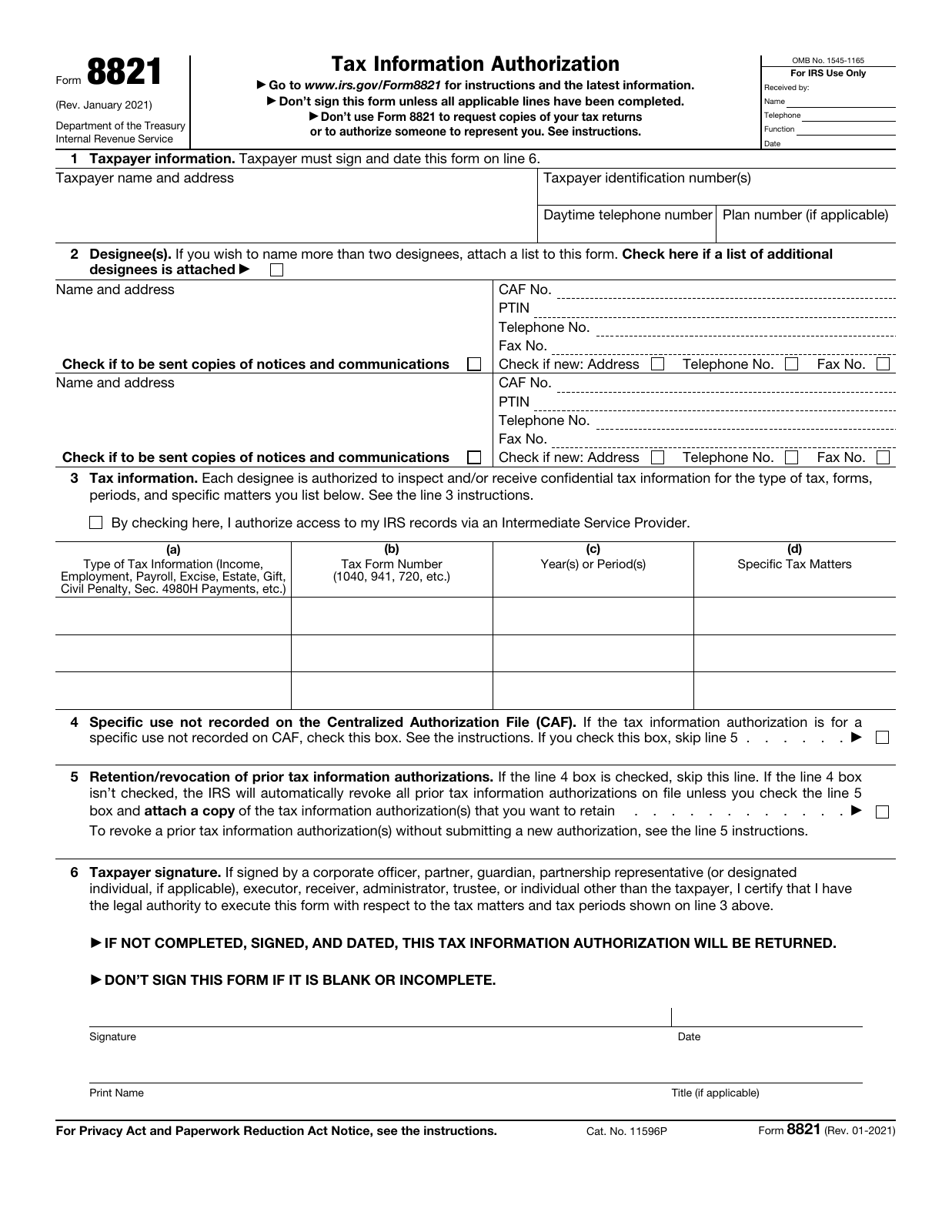
Source: IRS · 8821 · January 2021 · Official blank PDF
What to have ready Have the taxpayer’s identity and address, each designee’s contact details and CAF number if assigned, the exact tax matters and periods, and any prior authorizations you want to retain. Spouses prepare separate forms.
Choose who can see which information.
An 8821 is a permission to inspect or receive information, not a power of attorney. Define the people, tax matters and periods before you sign.
One taxpayer. Named recipients. A defined scope.
The taxpayer
You decide what is disclosed. A spouse needs a separate Form 8821 even for a joint return.
Only the listed information
The line 3 tax types, forms, periods and restrictions define the permission.
The named designees
Both named recipients share that scope. Notice copies and private-provider access are separate permissions.
No representation, substitution of another designee, refund-check negotiation or direct deposit of your refund. For representation, review Form 2848.
Locate the two designee spaces on the original
Make each row specific.
A period may be a year, a range, quarters or a fiscal ending month. A calendar picker cannot express every permitted entry. These examples show formats, not an authorization recommendation.
- (a) Tax information
- Income
- (b) Form
- 1040
- (c) Years or periods
- 2021 thru 2023
- (d) Specific matters
- not applicable
An explicit inclusive range; no extra restriction in column (d). Do not replace it with All years.
- (a) Tax information
- Employment
- (b) Form
- 941
- (c) Years or periods
- 2nd 2021-3rd 2022
- (d) Specific matters
- not applicable
Name the requested quarters. A fiscal year instead uses its ending year and month, for example 202406.
- (a) Tax information
- Civil penalty
- (b) Form
- N/A
- (c) Years or periods
- 2022
- (d) Specific matters
- Leave blank
For a stand-alone civil penalty, column (b) is N/A; a specific penalty need not be entered in (d).
- (a) Tax information
- IRA civil penalty
- (b) Form
- Leave blank
- (c) Years or periods
- 2022
- (d) Specific matters
- Leave blank
IRA civil penalty leaves both columns (b) and (d) blank.
- (a) Tax information
- Estate
- (b) Form
- 706
- (c) Years or periods
- 02/29/2024
- (d) Specific matters
- not applicable
For estate tax, column (c) uses the decedent’s actual date of death, not a general tax year. This date is fictional.
Fictional illustrations only. These controls do not read or change your answers. Future CAF periods are limited by the year the IRS receives the authorization; check the complete instructions before signing.
Compare the three original line 3 rows
What happens to earlier authorizations?
Line 4 controls whether line 5 applies. The illustration below is separate from your form answers.
- 4Line 4 stays unchecked.
- 5Line 5: choose whether to keep earlier authorizations.
To retain one, check line 5 and attach a copy. Otherwise, the IRS automatically revokes earlier tax information authorizations on file.
- 4Line 4 is checked.
- 5Skip line 5. Earlier authorizations are not revoked.
Certain lender, education, background-check and form-specific requests are not recorded on CAF. Send the authorization to the IRS office handling that matter; do not use the general CAF route automatically.
Read lines 4 and 5 together
Finish the permission before you send it.
Download the original page, review and complete the authorized signature and date. Follow the official submission rules for your use and signature method.

Review the scope and attachments
Confirm taxpayer identity, each designee, every requested period and the prior-authorization choice. Attach any additional-designee list and copies of authorizations to retain. This editor does not attach them.
Sign and date with the proper authority
An individual signs their own authorization; a spouse submits a separate form. Entities, plans, trusts and estates follow line 6 authority requirements. Printed name is not a signature.
Choose the permitted delivery method
Mail or fax needs a handwritten signature. An electronically signed form must use the IRS online submission process and applicable authentication rules. Specific-use authorizations go to the office handling the matter.
120-day rule: when disclosure is for a purpose other than addressing or resolving an IRS tax matter, the IRS must receive it within 120 days after signing. That rule does not apply to assistance with an IRS tax matter.
The download contains the single original page, editable and unsigned. FormAgile does not submit, fax, authenticate the signer or access IRS records. Check the current official mailing/fax instructions before sending.
See the original signature and printed-name area
Only revoking a previous authorization?
Do not prepare a new grant as a substitute. Follow line 5 of the instructions: write REVOKE across the earlier authorization and add a current signature and date. If you do not have a copy, send the required signed notification instead; specific-use revocations go to the office handling the case.
Read the official form and all instructionsSpecial situations and tool limits
Does this update my address with the IRS?
No. The address on an 8821 does not change your last known IRS address. Use Form 8822 for a home address or 8822-B for a business address separately.
Read the official form and all instructionsCan a designee represent me with this form?
An 8821 permits inspection or receipt of the listed information. It does not authorize representation or a substitute designee. Review Form 2848 when representation is needed.
Read the official form and all instructionsHow are my entries handled?
Your entries are processed in this browser page. Each form keeps its own draft during site navigation; refreshing or closing the page clears the drafts. Optional analytics, including Clarity recordings, follow your choice in Analytics settings and the Privacy Policy. Download a copy to keep your work.
Can I edit the downloaded PDF?
Yes. The exported PDF preserves the original page and editable fields. It is unsigned. Follow the recipient’s signing and delivery requirements.
Why might some text need review?
The original PDF has limited field space. If text cannot fit or its characters are unsupported by the PDF font, we will identify the field so you can revise it. We never silently remove characters or clip overflowing content.
Keep the complete instructions close.
This guide follows Form 8821, January 2021, and the separate September 2021 instructions. Check current IRS developments before signing.
8821 · January 2021
Need your own transcript instead?
Form 4506-T requests records; it does not grant this designee authorization.
Prepare Form 4506-TFormAgile is an independent service, not affiliated with the IRS or any government agency. Official blank forms are available free from the IRS. This tool does not provide tax or legal advice.